Value Retrieve

This action retrieves text from the current window, OCR position or from the clipboard.
NOTE: Requires a parent Window to be selected.
Automation sheet parameters:
- Source:
- Selected item – retrieves the value from the current item
- OCR text position – retrieves the value from the position identified by preceding “(OCR) Text locate“ action
- OCR mouse position – retrieves the value from the OCR position identified by preceding “Mouse click“ action
- JSON value – retrieves a specific value from a JSON after selecting the JSON text and Value identifier
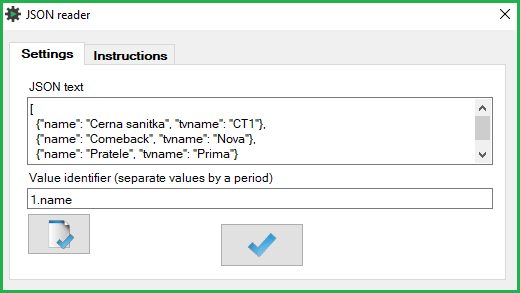
- Clipboard – retrieves the clipboard value
- Clear clipboard – clears the clipboard and returns no value
- Value (output field) – displays the retrieved value. The value is stored in the [value] variable
- Value
- displays the retrieved value. The value is stored in the [value] variable
Action parameters window: N/A
Was this article helpful?
That’s Great!
Thank you for your feedback
Sorry! We couldn't be helpful
Thank you for your feedback
Feedback sent
We appreciate your effort and will try to fix the article