Color check

NOTE: Requires a parent Window to be selected
This action checks for the existence of a specific color at a specified location. The location that is checked is based on the most recent preceding “Item select” or “(OCR) Text locate” position.
Automation sheet parameters:
- Color – defines the RGB color to be identified and the allowed variance percentage
- Position – defines the X, Y, width, height coordinates
- Result (output field) – displays the check true\false result. The value is stored in the [result] variable
Action parameters window:
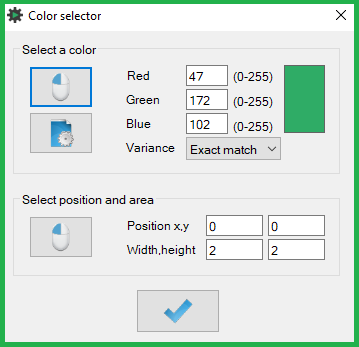
- Select a color section
- Clicking the mouse icon button automates the color selection using a mouse. To start, hold the CTRL key and click the color area in the target window subsequently
- Selection process instructions are displayed in the notification popup. Wait for a sound notification after each key press and mouse click before proceeding to the next step. The item selection mode will time out after 10 seconds if no action is taken
- Clicking the page icon button allows the selection of a color from the Windows color palette
- The selected color appears in the rectangle on the right side of the window
- You can adjust the tolerance for variance – Exact match / 5% / 10% / 20% / 30% / 40%
- Select position and area section
- Clicking the mouse icon button automates the color-check area coordinate selection using a mouse. To start, hold the CTRL key and click the middle of the starting-reference object, top-left and bottom-right of the color check area in the subsequent steps
- Selection process instructions are displayed in the notification popup. Wait for a sound notification after each key press and mouse click before proceeding to the next step. The item selection mode will time out after 10 seconds if no action is taken
- Click the OK button to update the action-step parameters
Was this article helpful?
That’s Great!
Thank you for your feedback
Sorry! We couldn't be helpful
Thank you for your feedback
Feedback sent
We appreciate your effort and will try to fix the article