Text enter

This action is used to enter text into the selected window.
NOTE: Requires a parent Window to be selected
Automation sheet parameters:
Options:
Send Keys: can be used to send text and keystrokes just as a person would
Set Value: sets the specified text as a value at once
- Text – text to be entered
Action parameters window:
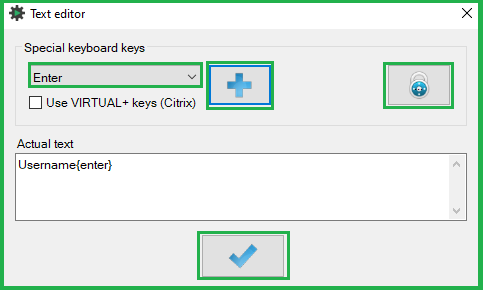
- Use the “Special keyboard keys” drop-down to select a special key such as CTR, ALT, ENTER etc. and the "Plus button" to add the key to the main text
- Use the "Encryption button" (lock icon) to convert passwords and other sensitive data. AutomationDock will automatically decrypt the values during execution.
NOTE: Decryption works only when the process is executed by the encryption creator on the original system! - Enter standard text directly into the “Actual text” window – this field refers to the "Text" field in automation sheet
parameters - Click the OK button (tick icon) to update the action-step parameter
Was this article helpful?
That’s Great!
Thank you for your feedback
Sorry! We couldn't be helpful
Thank you for your feedback
Feedback sent
We appreciate your effort and will try to fix the article